
Use these options to find what you are looking for
Create account
Before you can contribute data to the SPI-Birds Repository, you need to have a registered account.
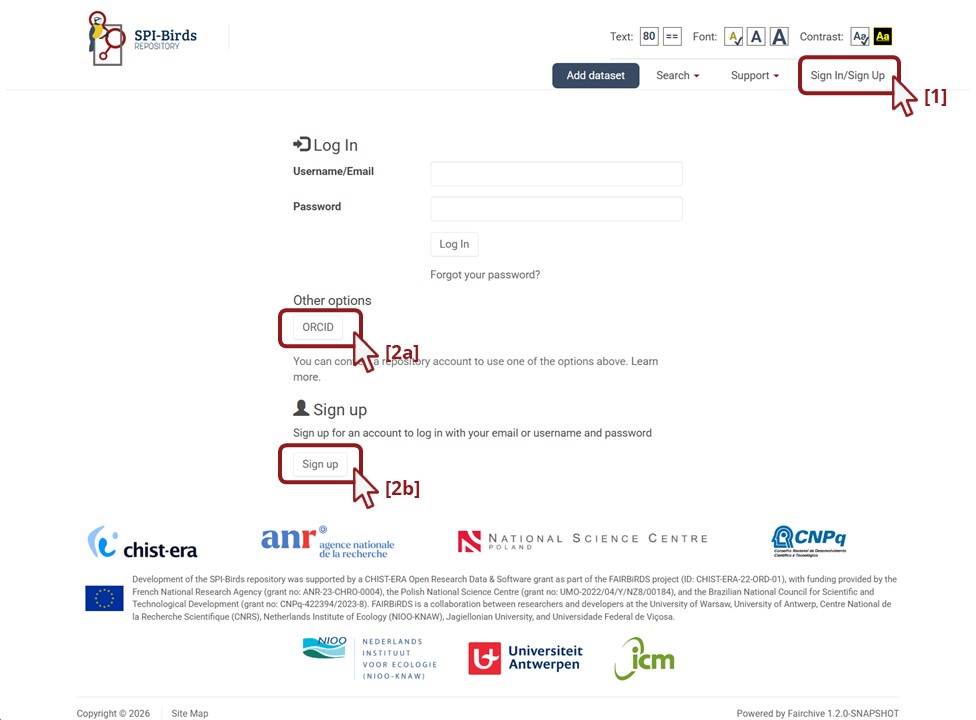
To create an account, click on Sign In/Sign Up on the repository main page (https://repository.spibirds.org/) [1]. Then, there are two options: signing up via ORCID [2a, see section Create account using ORCID] or signing up directly in the repository [2b, see section Create account in the repository].
Create account using ORCID
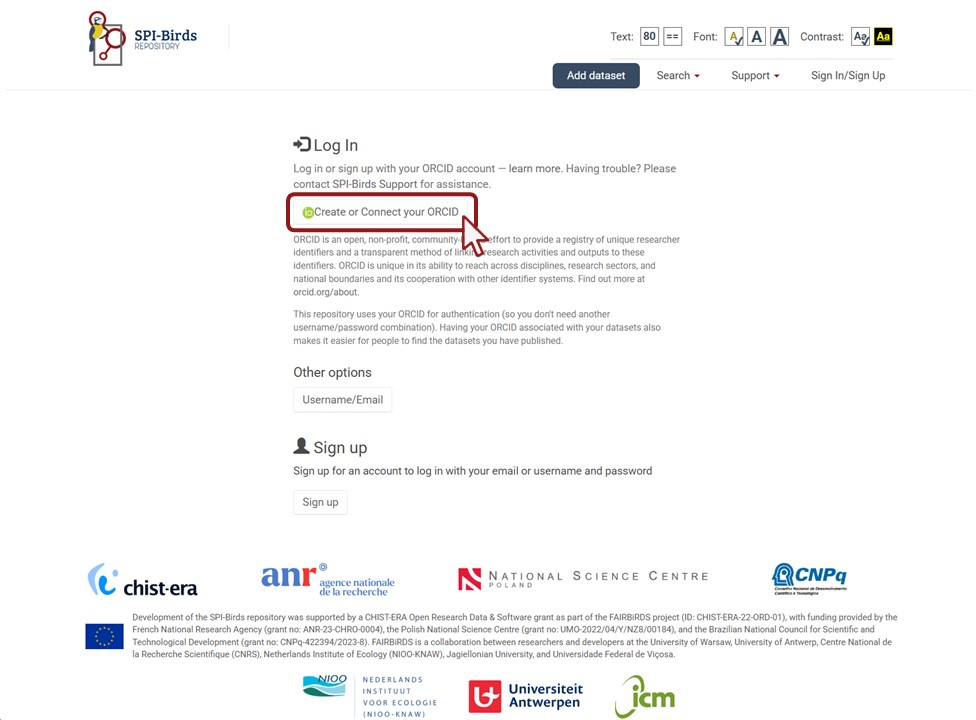
If you want to link your account on the SPI-Birds Repository to your ORCID, click on Create or Connect your ORCID.
Create account in the repository
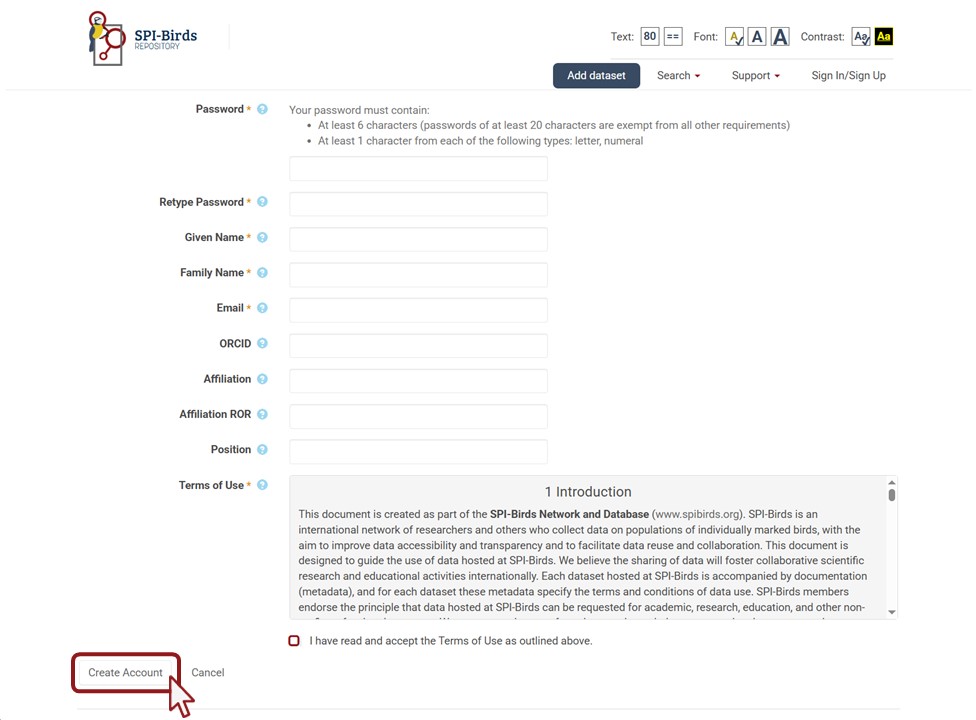
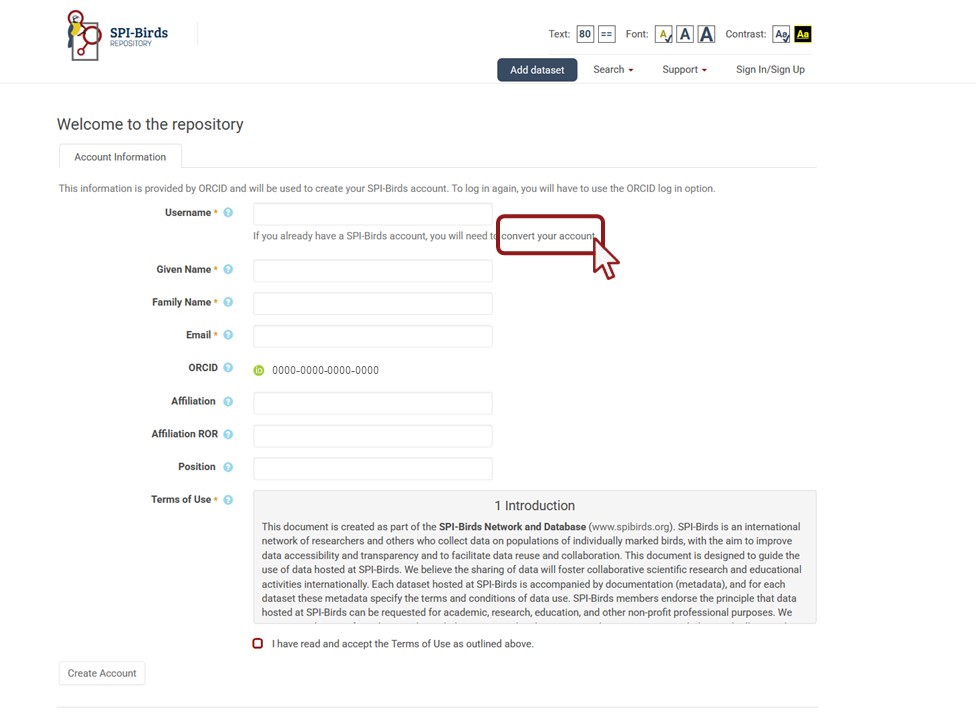
On the next page, fill in the required details. Hover your cursor over the tooltip (?) next to a field to learn more about it.
Note: For your Affiliation ROR, start typing the name of your organisation, and its ROR will pop up. ROR refers to Research Organization Registry (ROR), a global, community-led registry of open persistent identifiers for research and funding organisations.
After reading and accepting the Terms of Use, finish the creation of your account by clicking on Create Account.
Log in
After you have created an account on the repository, you must sign in to the SPI-Birds Repository at each subsequent visit. You can do this with your Username and Password or via ORCID.
If you do not already have an ORCID account, you can create one on the next page by clicking on Register now. If you already have an ORCID account, enter your login credentials and click Sign in to ORCID, and follow the ORCID workflow.
After you have signed in to ORCID, you are navigated back to the repository, where you can continue with the creation of your account (see Create account in the repository).
Contribute data
Data hosted at the SPI-Birds Repository are organised in collections. A collection (called a dataverse in Dataverse terms) is a container for datasets (the set of research data files, metadata, and documentation together) and other sub-collections, which can be set up for individual researchers, research groups, or organisations.
As a data custodian you have the flexibility to decide how you organise your data in the SPI-Birds Repository. You can add a dataset to the root collection SPI-Birds, and you organise your data in a collection created for you or your organisation.
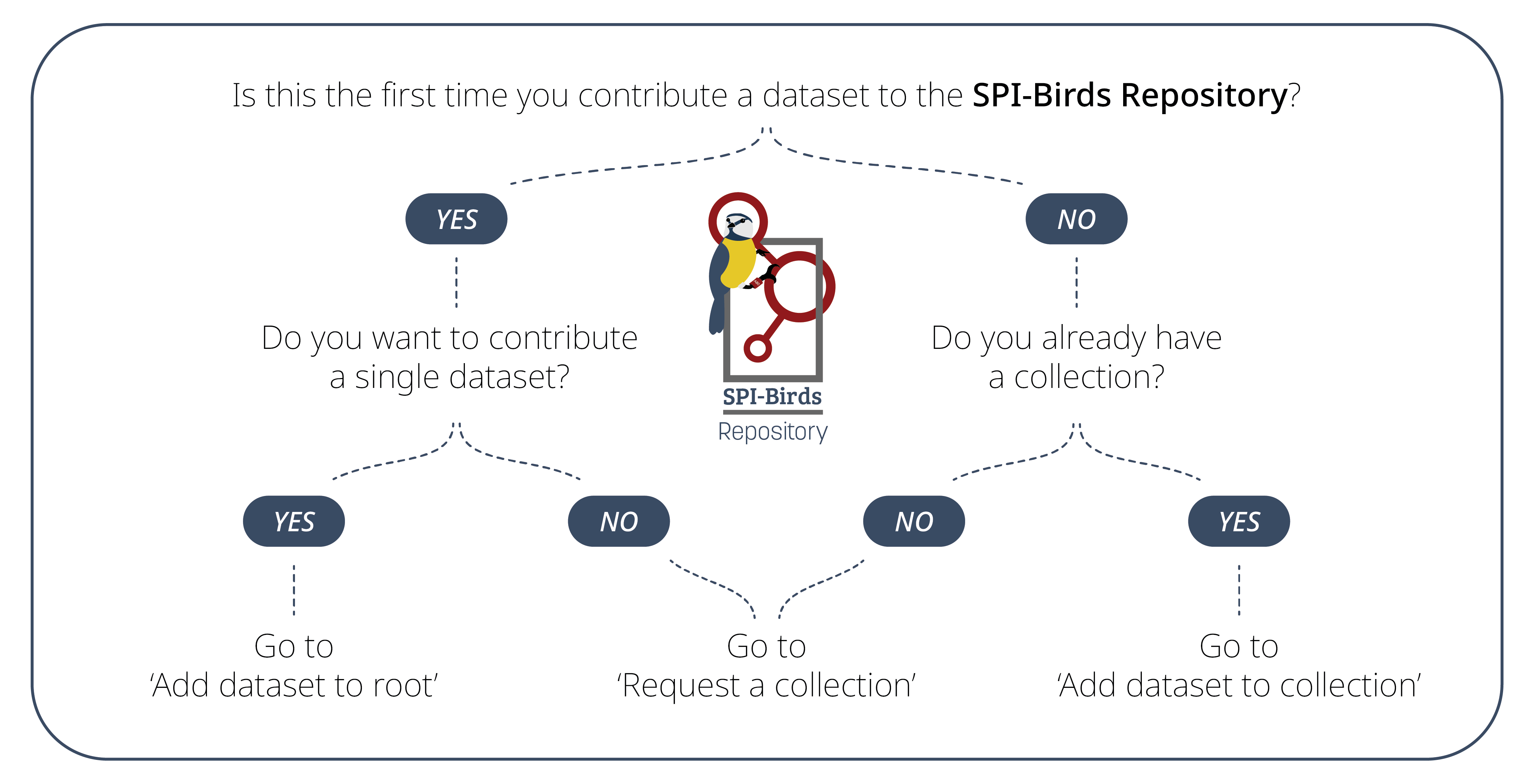
To help you decide on the organisation of your dataset(s), please follow these recommendations:
- If you want to contribute a single dataset, we recommend adding your data to the root collection SPI-Birds. Go to Add dataset to root. With a single dataset we mean:
- data collected from a single species at a single field site; or
- data collected from one or more species at one or more field sites following the same sampling protocol, for which you want to organise the same access and usage rights for all species and sites.
- In all other cases, we recommend requesting a collection and adding your datasets there. Go to Request a collection. These cases may include:
- data collected from one or more species at one or more field sites, for which you want to organise different access and usage rights for species and/or sites.
- two or more datasets that vary in temporal coverage, species coverage, or sampling protocols
- two or more datasets that vary in person or team in charge of the field study and data management
- If you are in doubt and wonder what the best approach is for your case, feel free to reach out to us spibirds@nioo.knaw.nl.
Add dataset to root
The root collection SPI-Birds is the main directory of the SPI-Birds Repository. Anyone with a registered account can add their dataset to this collection.
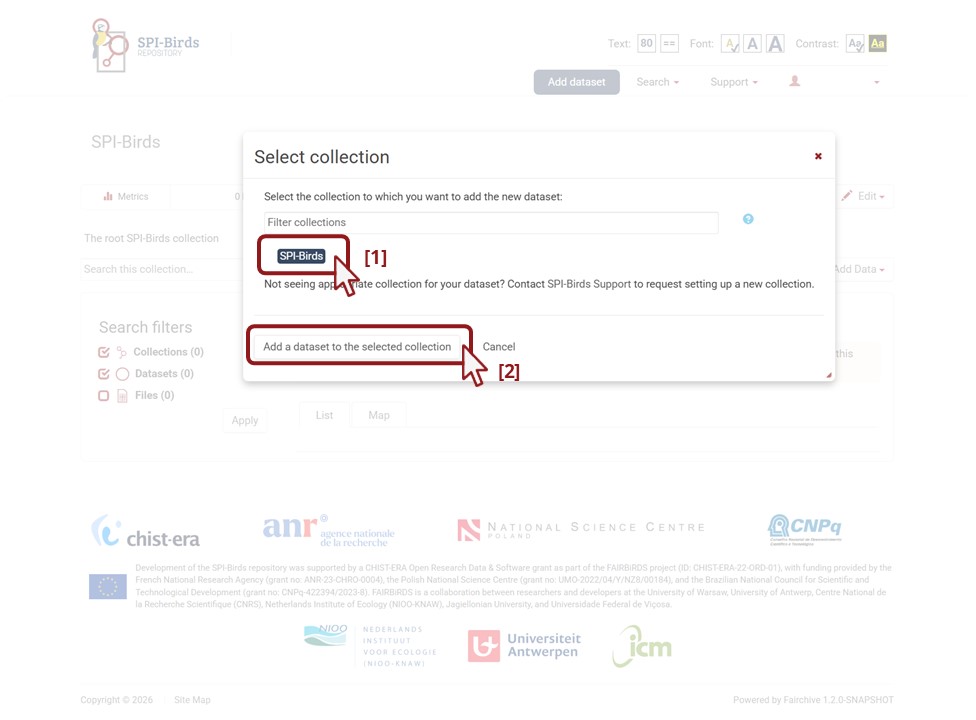
To add your dataset to the root, click on Add dataset.

Next, select the SPI-Birds collection by clicking on it [1]. Then, click on Add a dataset to the selected collection [2].
The next step is to fill the dataset form with your dataset’s metadata. Go to Fill in metadata form.
Request a collection
A collection (called a dataverse in Dataverse terms) is a container for datasets (the set of research data files, metadata, and documentation together) and other sub-collections, which can be set up for individual researchers, research groups, and organisations.
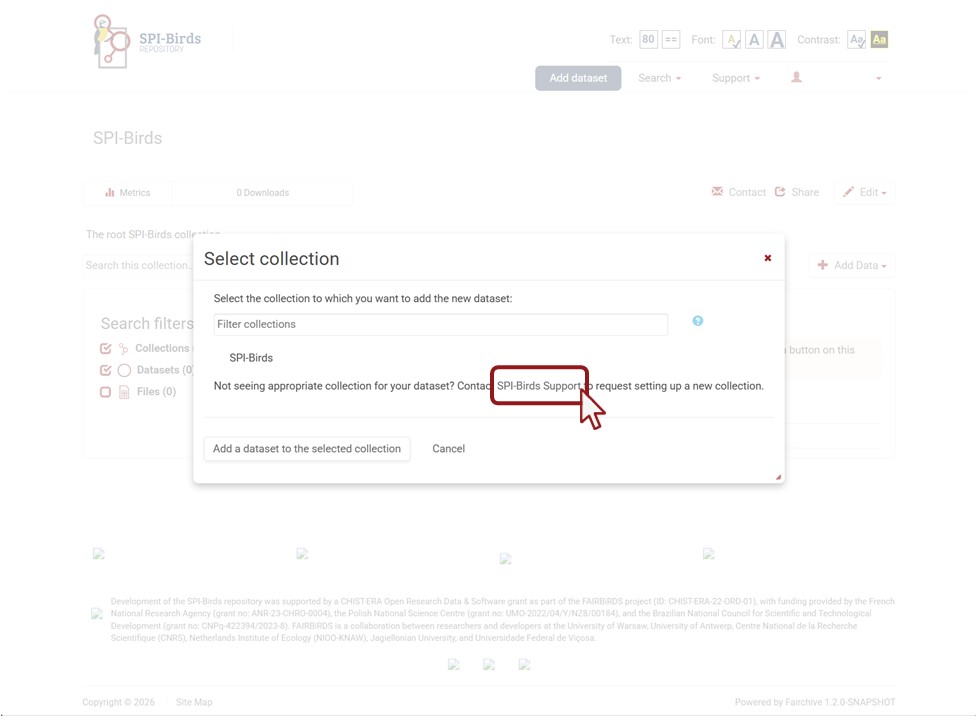
To request the creation of a collection, click on Add dataset.

Next, click on SPI-Birds Support.
In the contact form that appears, describe your situation. Include in the description:
the number of datasets that you wish to administer in a collection
the type of organisation you are making this request for (e.g. department, research group, institution)
a short (one paragraph) description of your research to go with the collection
the email addresses of the repository accounts of people who, besides you, require curator access to the collection (e.g. be able to add and edit datasets)
a suggestion for the name of your collection. Collection names should preferably be concise and unique. They ideally take the name of research groups, departments, institutes or other organisations.
Do not forget to solve the equation at the bottom of the form before you click on Send Message.
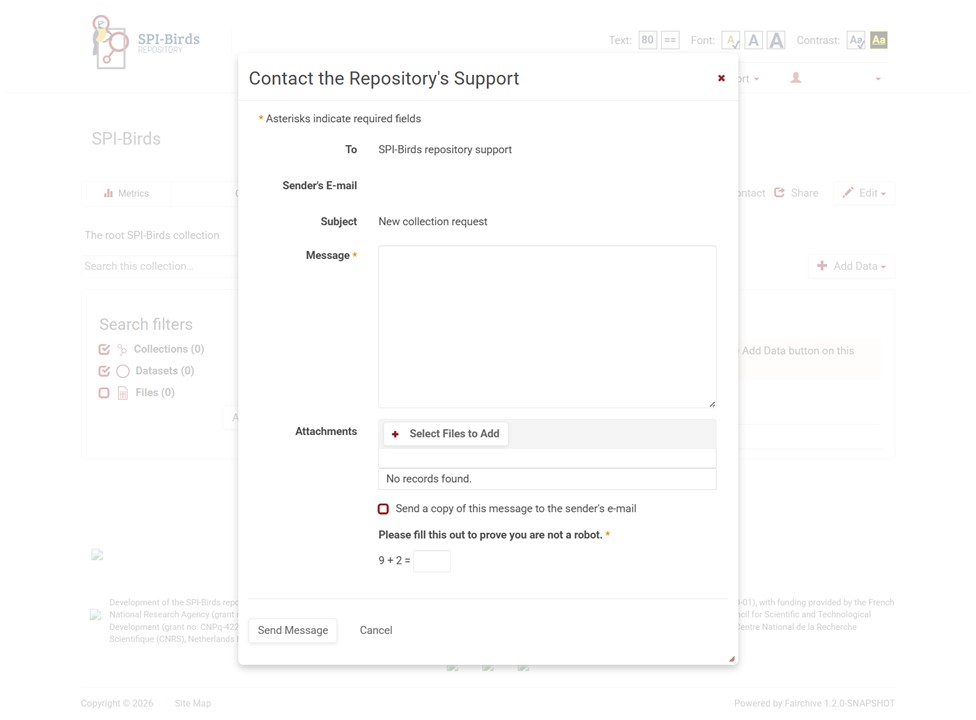
The SPI-Birds team will process your request and inform you when your collection is created. If your desired collection name already exists or if the team has inquiries otherwise, you will be contacted.
In the meantime, while waiting for your collection to be created, you may already add your dataset to the root collection (go to Add dataset to root). The SPI-Birds team can migrate your dataset to your collection afterwards.
Add dataset to collection
After you have requested your collection, you can add your dataset to this collection.
To add your dataset to your collection, click on Add dataset.

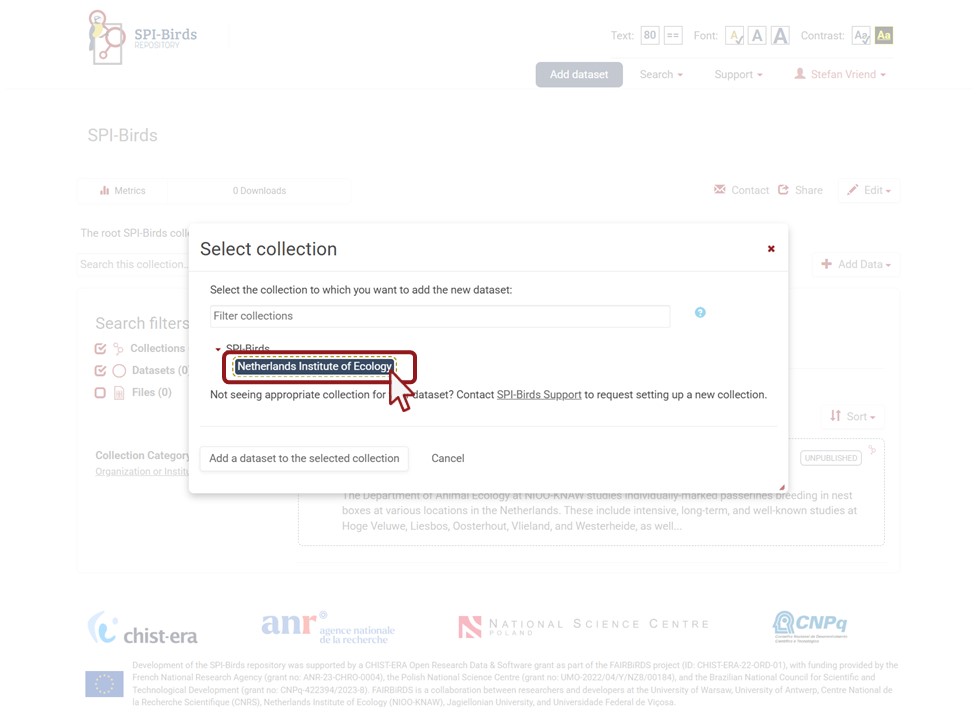
Next, select your collection by clicking on it. Then, click on Add a dataset to the selected collection.
Fill in metadata form
Metadata are data about data, or, in other words, a definition and description of the characteristics of your dataset. This includes pieces of information such as data authorship, data coverage, methods and protocols used to collect the data. Through this form you register your dataset in the SPI-Birds Repository and you join the growing SPI-Birds network.
The metadata form contains different sections, each related to a different set of metadata fields.
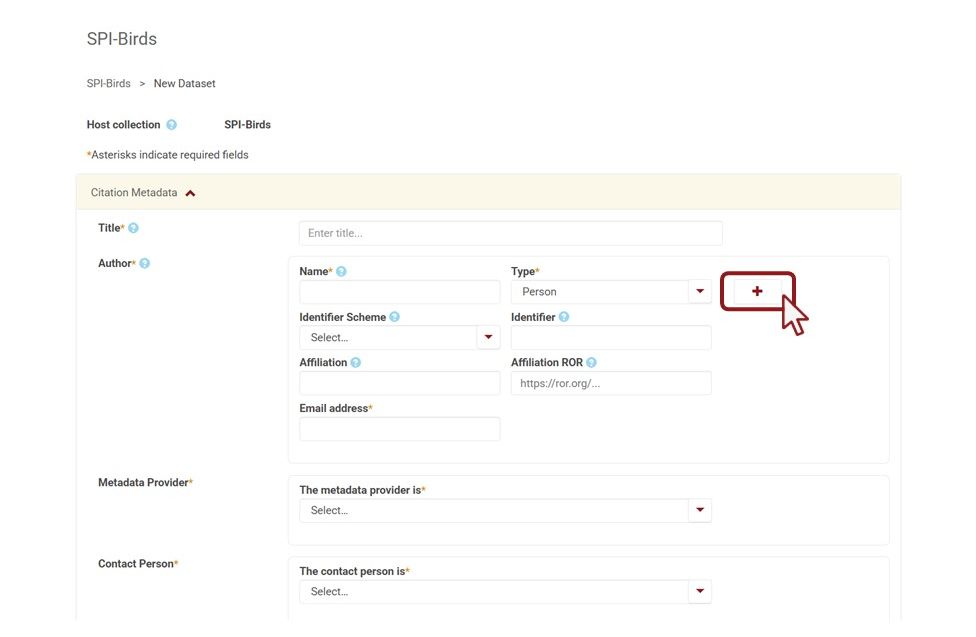
Citation Metadata are the title and people involved in the creation and management of your dataset, similar to the title and author list of a scientific paper. We differentiate between three types of people involved:
- Author. Person or organisation responsible for creating the dataset.
- Metadata Provider. Person filling in the metadata form.
- Contact Person. Person that serves as a contact point for questions about the use and interpretation of the dataset.
To add more than one Author or Contact Person, click on the + button.
Taxonomic Coverage includes the species and subspecies of which you collect data.
When selecting a subspecies (e.g., Parus major karelini), include the parent name (e.g., Parus major).

Geospatial Metadata contains the information about the site(s) where the data collection takes place, including a habitat type classification and spatial coverage.
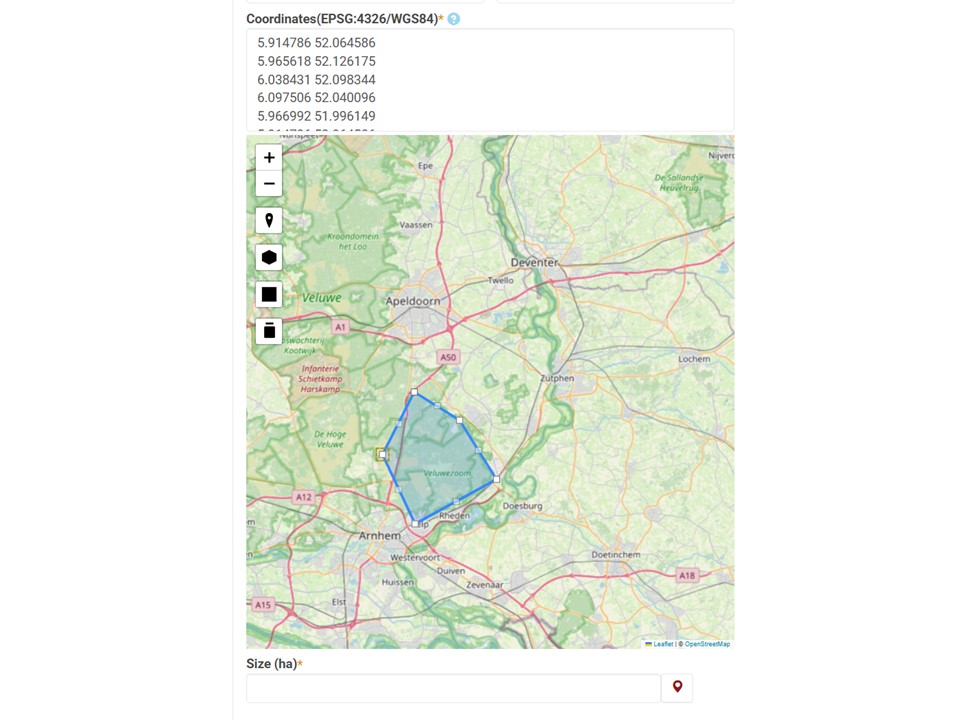
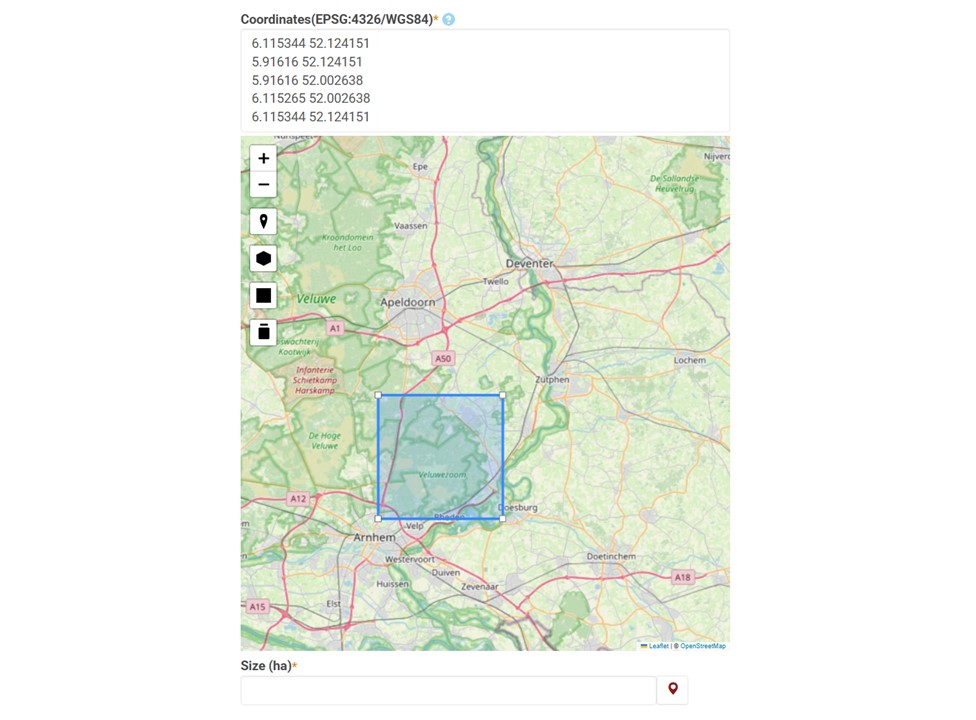
Use the interactive map to indicate where the study site is located. You can draw your study area as a centre point [1], a polygon [2], or a bounding box [3].
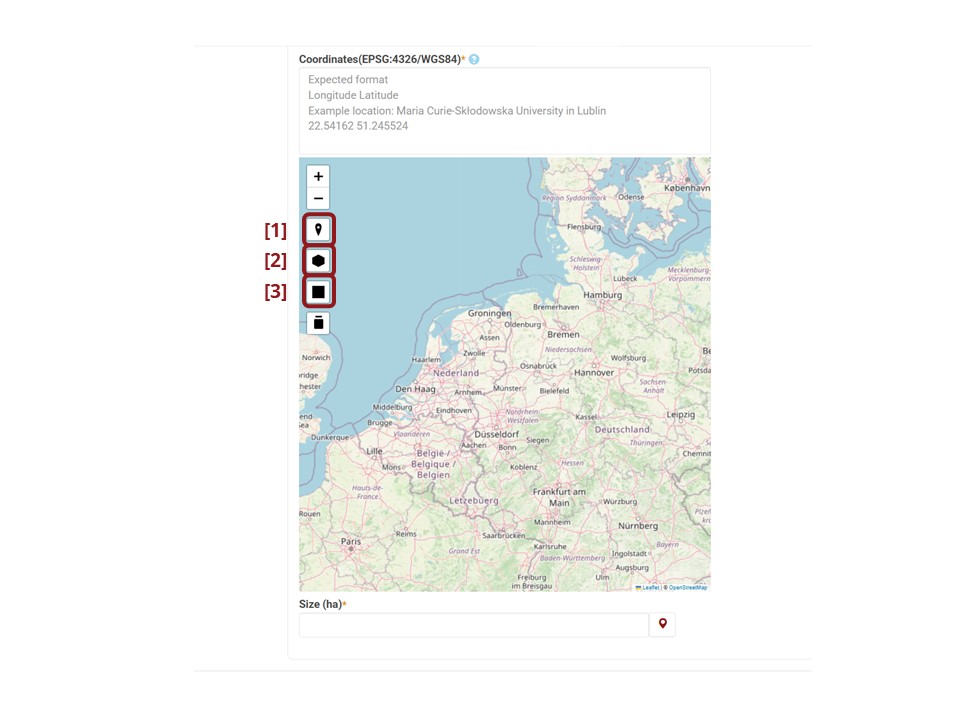
With the polygon tool, you can draw any non-intersecting shape that represents your study site by indicating the vertices (nodes) on the map. When you are done, make sure to close the polygon by clicking on the starting vertex (node). After a polygon is completed, you can reshape your polygon by dragging a vertex in the map or changing the values in the text box.
With the bounding box, you can drag a rectangular bounding box that represents your study site.
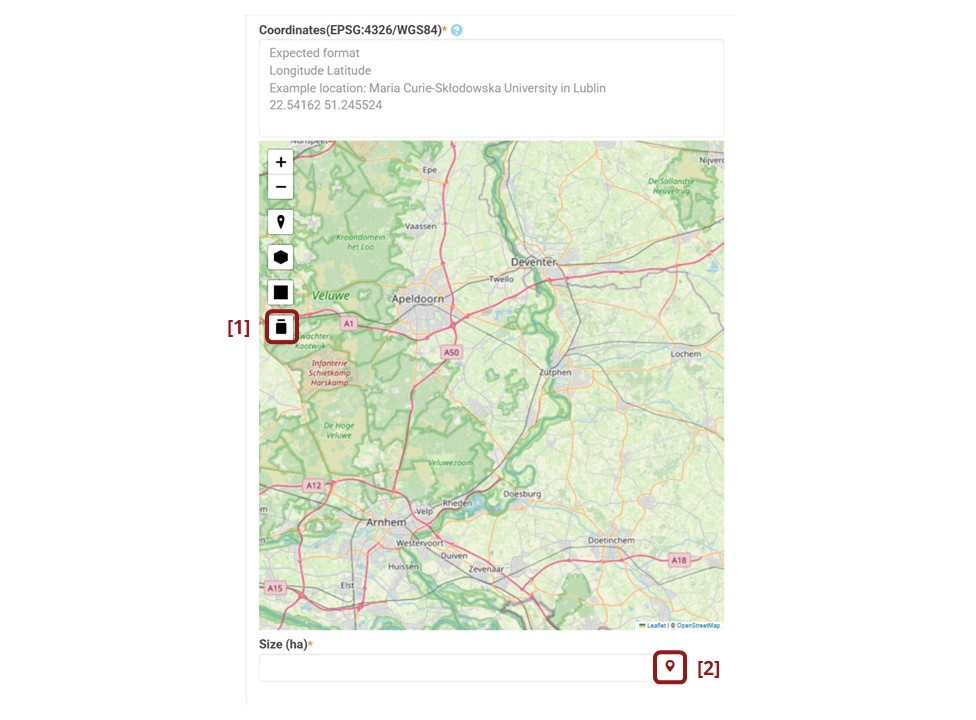
To clear your centre point, polygon or bounding box, click on the recycle bin button [1]. The size of your study site can be automatically calculated using the marker button on the right [2].
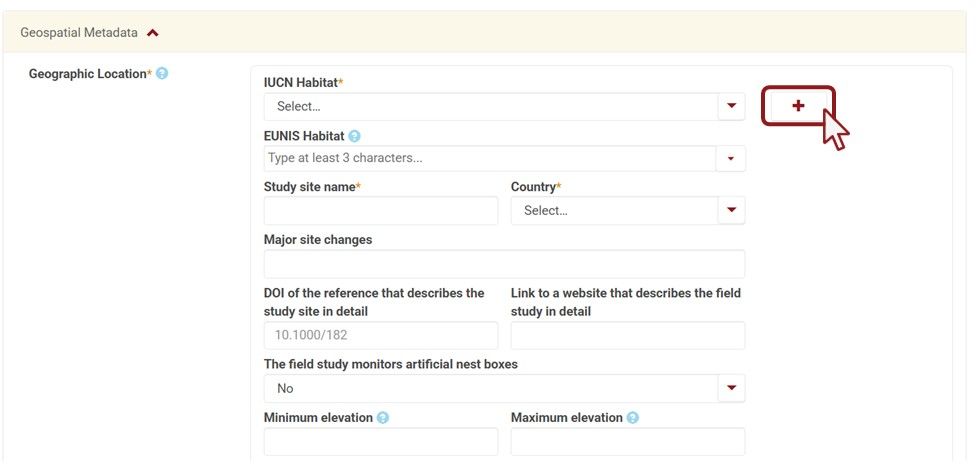
A single dataset can contain data collected from multiple study sites. Note: Check our decision tree to help you decide when to describe multiple sites in a single dataset and when to separate them across different datasets.
Use the + button to add multiple sites to a single dataset.
Temporal Coverage includes the start and end of your data collection. If your collection is ongoing, provide the latest available year for which you will make data available as end year or leave empty.
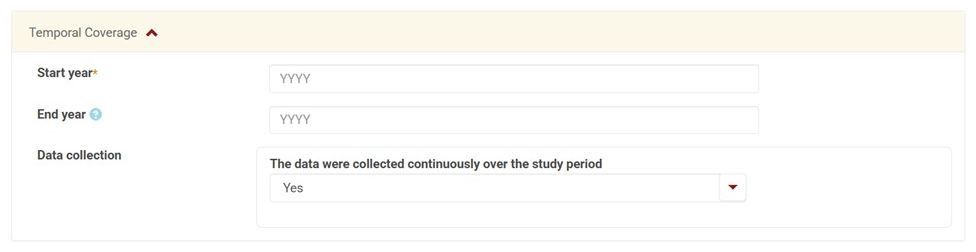
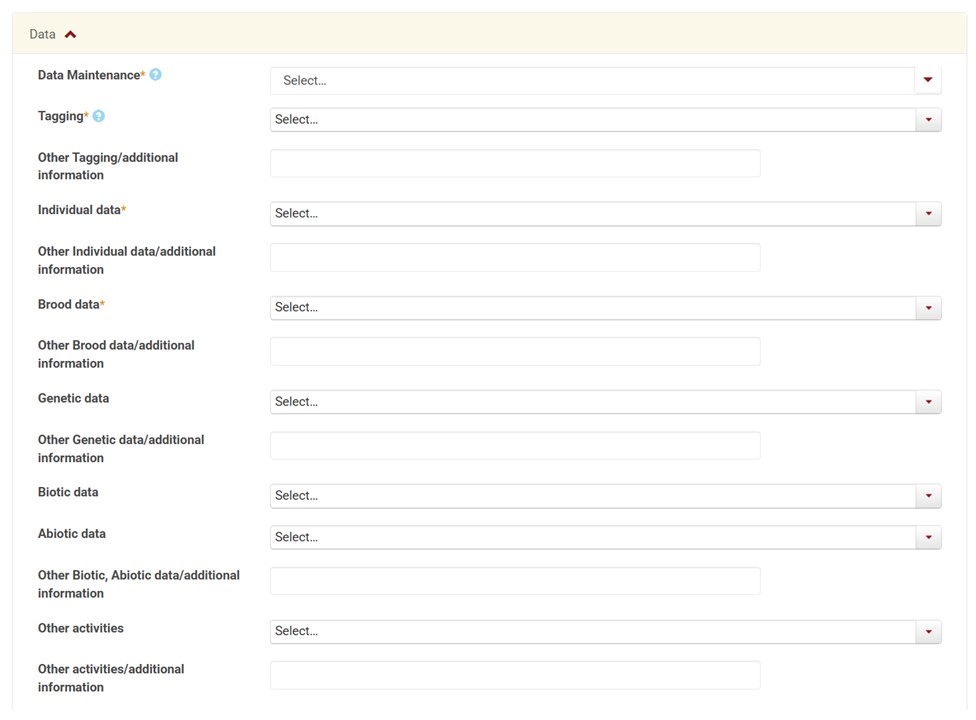
Data is a section that includes a description of how often you expect your dataset to be updated and which data are collected in your dataset.
Important considerations:
- If descriptions vary between species and/or sites included in this dataset, please specify in the free-text field. If all descriptions differ extensively between species and/or sites, use the decision tree to reconsider whether they should be submitted as separate datasets.
- Please only include measurements that you have collected yourself, and not data collected by third parties (e.g., weather data collected by a meteorological institute).
Funding is a section in which you may acknowledge funders and list grant numbers through which parts of the data collection were financed.

Consents. At the end of the form, you are asked to confirm that your metadata may be archived as part of the SPI-Birds repository, that your metadata may be published publicly on the repository’s website, and that you have the rights or permissions to submit the metadata provided in the form.
After completing the form, you may choose to upload the associated data files directly via the data upload window at the bottom of the page. To do so, go to Upload data files.
This is, however, not mandatory. You may decide to only contribute the metadata of a dataset or upload your data files at a later stage.
When you are done, click Save Dataset.
Publish dataset
After you have completed the metadata form (see Fill in metadata form), your dataset is marked as a draft and not yet available to the public [1].
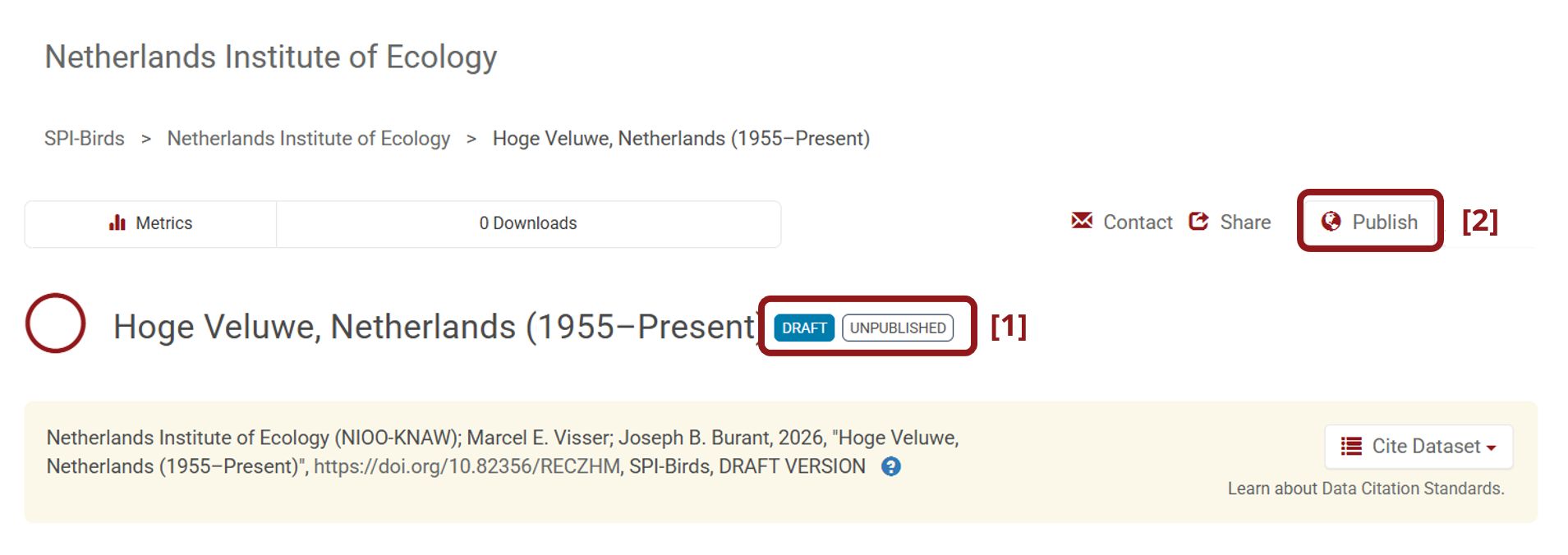
If at this stage you only want to make the metadata available to the public, proceed below. If you also want to upload data files, go to Upload data files first.
Once your dataset is ready to go public, so that others can search for it, go to your dataset page and click on the “Publish” button on the right hand side of the page [2].
A pop-up window will appear to confirm that you are ready to actually Publish since once a dataset is made public it can no longer be unpublished.
Upload data files
You can upload data files while filling out the metadata form or afterwards when the dataset is already created.
Tip: to increase the interpretation of your data files, consider uploading a README or text file describing the files, including a description of column/variable names and the meaning of values.
During the metadata submission, you can drag and drop files in the data upload box at the bottom of the metadata form.
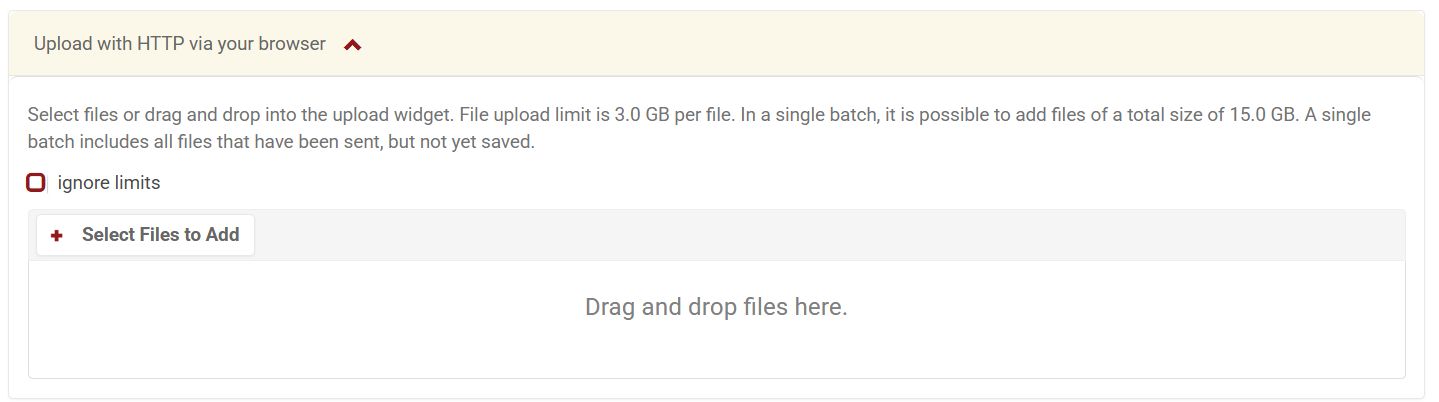
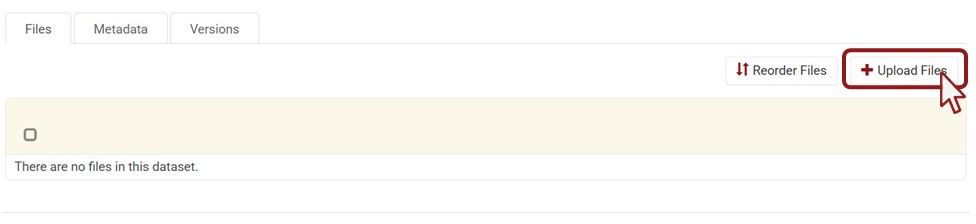
When the dataset is already created, you can upload files by clicking on Upload Files.
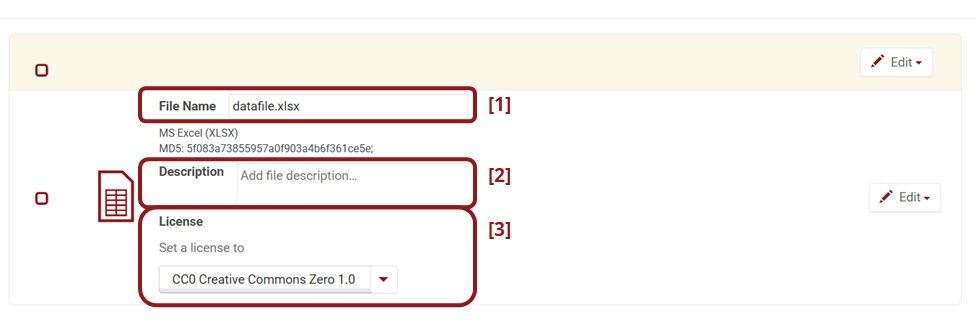
Select the data files that you want to upload. For each file, provide a file name [1], description of what the file contains [2] and a license [3].
The SPI-Birds Repository supports the following license options:
- CC0 - Creative Commons Zero
- CC BY - Creative Commons Attribution
- CC BY-NC - Creative Commons Attribution NonCommercial
- Restricted Access
CC0 is a waiver of your copyright, making it free to use without attribution. CC BY makes your file openly available for others to reuse your data whilst still ensuring that users give you credit. CC BY-NC is similar to CC BY, except that the data may not be used for commercial activities. For further descriptions of Creative Commons licenses, see https://creativecommons.org/share-your-work/cclicenses/. To help choose a Creative Commons license, see https://creativecommons.org/chooser/.
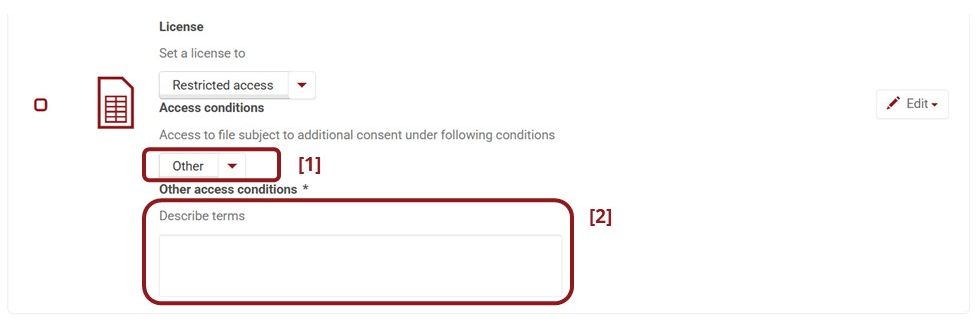
The Restricted Access license allows you to state under what conditions files can be accessed. You can choose one of the listed options or provide your own conditions.